Open Laboratory for Technocrats

Grab the developer role, learn concepts & prepare with senior software engineers to get solutions for problems in a software job. Coding and Programming Solutions crafted for you.

gRPC for Developers: The Ultimate Guide for Developers


gRPC is a high-performance, open-source framework developed by Google that allows developers to build distributed systems and microservices. It uses the Remote Procedure Call (RPC) protocol to enable communication between client and server applications, making it an ideal solution for building fast and efficient APIs. In this article, we'll take a closer look at what gRPC is, how it works, and why developers should consider using it.

Table of Contents

  1.  What is gRPC?

  2.  How does gRPC work?

  3.  gRPC vs. REST API

  4.  gRPC features and benefits

    1.  Language support

    2.  Performance and efficiency

    3.  Interoperability

    4.  Stream processing

    5.  Authentication and security

  5.  gRPC use cases

  6.  Building a gRPC application

    1.  Setting up a gRPC server

    2.  Implementing the service interface

    3.  Creating a gRPC client

  7.  gRPC tools and libraries

    1.  Protocol Buffers

    2.  gRPC Gateway

    3.  gRPC Load Balancing

    4.  gRPC Interceptors

  8.  gRPC best practices

    1.  Use protocol buffers effectively

    2.  Optimize for performance

    3.  Use error handling and retries

    4.  Use gRPC reflection for debugging

  9.  Conclusion

  10.  FAQs

1. What is gRPC?

gRPC is a high-performance, open-source framework developed by Google for building distributed systems and microservices. It uses the RPC protocol to enable communication between client and server applications, making it an ideal solution for building fast and efficient APIs.

gRPC uses Protocol Buffers as the default data serialization format, which provides a more efficient and extensible way to serialize structured data than other formats like JSON or XML. This makes gRPC ideal for building APIs that need to handle large volumes of data and require high throughput.

2. How does gRPC work?

gRPC uses a client-server model for communication. A gRPC client sends a request to a gRPC server, which processes the request and sends a response back to the client. The communication between the client and server is done using a binary protocol, which makes it more efficient than other protocols like JSON or XML.

gRPC supports two types of communication: unary and streaming. In unary communication, the client sends a single request and the server sends a single response. In streaming communication, the client and server can send multiple requests and responses over a single connection, which is useful for building real-time applications or handling large volumes of data.

3. gRPC vs. REST API

gRPC and REST API are two popular options for building APIs. While both serve the same purpose, there are some key differences between them.

REST API uses the HTTP protocol for communication, while gRPC uses the RPC protocol. This makes gRPC more efficient and faster than REST API, especially when handling large volumes of data.

REST API uses JSON or XML as the data serialization format, while gRPC uses Protocol Buffers. Protocol Buffers provides a more efficient and extensible way to serialize structured data than JSON or XML, which makes gRPC more suitable for building APIs that require high throughput.

4. gRPC features and benefits

4.1 Language support

gRPC supports multiple programming languages including Java, Python, C++, Ruby, Go, and many others. This makes it easy for developers to use gRPC regardless of the language they're most comfortable with.


4.2 Performance and efficiency (continued)

gRPC's binary protocol makes it more efficient than other protocols like JSON or XML. It also uses HTTP/2 as the transport layer protocol, which allows for multiplexing, header compression, and flow control. This leads to faster and more efficient communication between client and server applications.

4.3 Interoperability

gRPC is designed to be interoperable across different programming languages and platforms. It uses Protocol Buffers as the default data serialization format, which can be easily generated for different programming languages. This means that a gRPC client written in one language can communicate with a gRPC server written in a different language.

4.4 Stream processing

gRPC supports both unary and streaming communication, which makes it ideal for building real-time applications or handling large volumes of data. Streaming communication allows for continuous data exchange between the client and server over a single connection, which can be useful in scenarios like real-time chat or video streaming.

4.5 Authentication and security

gRPC provides built-in support for authentication and security using Transport Layer Security (TLS) encryption. This ensures that communication between the client and server is secure and cannot be intercepted by malicious actors.

5. gRPC use cases

gRPC can be used in a variety of scenarios, including:

  • Microservices architecture

  • Real-time communication

  • High-performance APIs

  • Large-scale data processing

  • Cross-platform communication

6. Building a gRPC application

Building a gRPC application involves three main steps: setting up a gRPC server, implementing the service interface, and creating a gRPC client.

6.1 Setting up a gRPC server

The first step in building a gRPC application is setting up a gRPC server. This involves defining the service interface and implementing the server-side logic for handling requests.

6.2 Implementing the service interface

The service interface defines the methods that the gRPC client can call on the server. It is defined using Protocol Buffers, which makes it easy to generate client and server code for different programming languages.

6.3 Creating a gRPC client

The final step in building a gRPC application is creating a gRPC client. This involves generating client code using the service interface definition and making calls to the server using the generated client code.

7. gRPC tools and libraries

gRPC provides several tools and libraries that make it easier to build and manage gRPC applications. Some of the most popular ones include:

7.1 Protocol Buffers

Protocol Buffers is the default data serialization format used by gRPC. It provides a more efficient and extensible way to serialize structured data than other formats like JSON or XML.

7.2 gRPC Gateway

gRPC Gateway is a proxy server that allows REST clients to access gRPC services. It translates HTTP/REST requests into gRPC requests and vice versa.

7.3 gRPC Load Balancing

gRPC Load Balancing allows you to distribute incoming requests across multiple gRPC servers to improve performance and reliability.

7.4 gRPC Interceptors

gRPC Interceptors allow you to add cross-cutting concerns like logging, authentication, and authorization to your gRPC application.

8. gRPC best practices

To get the most out of gRPC, there are some best practices that developers should follow:

8.1 Use protocol buffers effectively

Protocol Buffers is a powerful tool, but it can be challenging to use effectively. Developers should take the time to learn how to use it properly and leverage its advanced features like nested messages and oneof fields.

8.2 Optimize for performance

gRPC is designed to be fast and efficient, but there are still ways to optimize performance. For example, you can use server-side streaming or bidirectional streaming to reduce network round trips and improve overall performance.

8.3 Use proper error handling

Error handling is important in any application, but it is especially important in distributed systems like gRPC. Developers should define clear error codes and messages, and handle errors gracefully on both the client and server side.

8.4 Monitor and trace your gRPC applications

Monitoring and tracing can help you identify performance bottlenecks and errors in your gRPC application. Use tools like Prometheus and OpenTracing to collect and analyze performance data.

8.5 Secure your gRPC application

Security is critical in any application, but it is especially important in distributed systems like gRPC. Use TLS encryption to secure communication between the client and server, and implement proper authentication and authorization mechanisms to prevent unauthorized access.

9. Conclusion

gRPC is a modern, high-performance RPC framework that provides a number of benefits for developers. With its efficient binary protocol, support for streaming communication, and built-in security features, it is a great choice for building real-time, high-performance applications.

By following best practices like using Protocol Buffers effectively, optimizing for performance, and properly handling errors, developers can get the most out of gRPC and build robust and reliable applications.

10. FAQs

  1. What is gRPC?

gRPC is a modern, high-performance RPC framework that allows developers to build fast and efficient distributed systems.

  1. What programming languages does gRPC support?

gRPC supports a variety of programming languages, including C++, Java, Python, Ruby, and Go.

  1. What are Protocol Buffers?

Protocol Buffers is a data serialization format used by gRPC that provides a more efficient and extensible way to serialize structured data than other formats like JSON or XML.

  1. What is the difference between unary and streaming communication in gRPC?

Unary communication involves sending a single request and receiving a single response while streaming communication allows for continuous data exchange over a single connection.

  1. What is gRPC Load Balancing?

gRPC Load Balancing allows you to distribute incoming requests across multiple gRPC servers to improve performance and reliability.


  1. What security measures should be taken when using gRPC?

It is important to use TLS encryption to secure communication between the client and server and implement proper authentication and authorization mechanisms to prevent unauthorized access.

  1. Can gRPC be used for real-time communication?

Yes, gRPC supports streaming communication, making it a great choice for building real-time applications.

  1. Is gRPC suitable for a microservices architecture?

Yes, gRPC is a great choice for building microservices due to its efficient binary protocol, support for streaming communication, and built-in security features.

  1. What are some common use cases for gRPC?

Some common use cases for gRPC include building real-time applications, microservices, and APIs for mobile and web applications.

  1.  Can gRPC be used in cloud-native environments?

Yes, gRPC is a great choice for building cloud-native applications due to its efficient binary protocol, support for streaming communication, and built-in security features.

In conclusion, gRPC is a powerful and efficient RPC framework that can be used for building fast and reliable distributed systems. By following best practices and taking advantage of its features, developers can build high-performance applications that are well-suited for modern, cloud-native environments. Whether you are building microservices, real-time applications, or APIs for mobile and web, gRPC is a great choice for your next project.
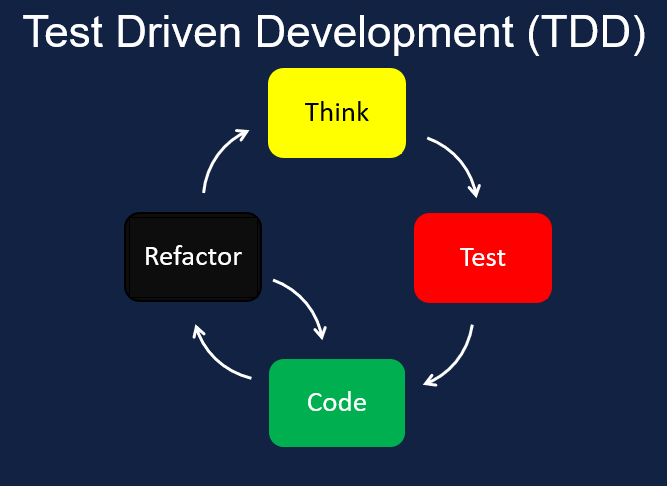

TDD - Test-driven development for beginner


Test-driven development (TDD) is a software development approach in which developers write tests for their code before they write the code itself. This approach can help developers create more reliable and well-designed code, as it allows them to verify that their code meets the requirements and behaves as expected.

The process of TDD typically involves the following steps:

  1. 1. Write a test: The developer writes a test that describes the desired behavior of the code they are about to write. This test should define the inputs and expected outputs of the code.

  2. 2. Run the test: The developer runs the test to confirm that it fails, as the code being tested has not been written yet.

  3. 3. Write the code: The developer writes the code that is being tested and ensures that it meets the requirements of the test.

  4. 4. Run the test again: The developer runs the test again to verify that it passes, indicating that the code meets the requirements and behaves as expected.

  5. 5. Refactor the code: If the code passes the test, the developer may choose to refactor the code to improve its design or performance.

This process is then repeated for each new feature or bug fix, with the developer writing a test, writing the code, and verifying that the code meets the requirements of the test.

Benefits of TDD

There are several benefits to using the test-driven approach in software development:

  • 1. Improved code quality: By writing tests before writing the code, developers can ensure that their code meets the requirements and behaves as expected. This can lead to fewer bugs and a higher level of reliability.

  • 2. Faster development: By writing tests before writing the code, developers can identify and fix problems early in the development process, which can save time and resources in the long run.

  • 3. Easier maintenance: Code that is written using TDD is typically easier to maintain and modify, as it is well-designed and has a comprehensive suite of tests. This can make it easier for developers to make changes to the code without introducing new bugs.

  • 4. Greater confidence: By verifying that their code meets the requirements and behaves as expected, developers can have greater confidence in the quality of their code and be more productive.

Tips for using TDD

Here are some tips for using the test-driven approach in your own development projects:

  • 1. Start small: It can be helpful to start by using TDD for smaller features or bug fixes, as this can help you get a feel for the process and build up your skills.

  • 2. Write tests first: Make sure to write your tests before writing the code that is being tested. This can help you focus on the requirements and desired behavior of the code.

  • 3. Keep your tests small and focused: It's important to keep your tests small and focused on a specific aspect of the code. This can make it easier to identify problems and fix them.

  • 4. Use test-driven development for the entire development process: It's important to use TDD throughout the entire development process, including when writing new features and making changes to existing code.

  • 5. Use a test runner: A test runner is a tool that can help you automate the process of running and managing your tests. This can save time and make it easier to work with a large number of tests.

Conclusion

Test-driven development is a powerful software development approach that can help developers create reliable and well-designed code. By writing tests before writing the code, developers can verify that their code meets the requirements and behaves as expected, leading to fewer bugs and a higher level of reliability. By following the tips outlined above, developers can make the most of the test

Test-Driven Development (TDD) vs Behavior-Driven Development (BDD) vs Acceptance Test-Driven Development (ADD)


Test-Driven Development (TDD), Behavior-Driven Development (BDD), and Acceptance Test-Driven Development (ADD) are three popular software development methodologies that are used to ensure the quality of software applications. While each approach has its own unique characteristics and benefits, they all aim to achieve the same goal: to deliver high-quality software that meets the requirements of the users.

In this blog post, we will explore the differences and similarities between TDD, BDD, and ADD, and discuss the pros and cons of each approach. We will also provide some tips and best practices for implementing these methodologies in your software development process.

Test-Driven Development (TDD)

Test-Driven Development is a software development process that involves writing tests for a piece of code before actually writing the code itself. This approach helps developers ensure that their code is working as intended and meets the requirements of the users.

The process of TDD typically involves the following steps:

  1. 1. Write a test case: The first step in TDD is to write a test case that outlines the expected behavior of the code. This test case should be written before the code is written, as it helps developers understand the requirements and constraints of the code.

  2. 2. Run the test: Once the test case has been written, it is run to see if it passes or fails. As the code has not been written yet, the test should fail.

  3. 3. Write the code: The next step is to write the code that will be tested by the test case. The code should be written in a way that meets the requirements outlined in the test case and passes the test when run.

  4. 4. Run the test again: After the code has been written, the test is run again to see if it passes. If the test passes, it means that the code meets the requirements and is working as intended.

  5. 5. Refactor the code: The final step in TDD is to refactor the code, which means to make improvements or changes to the code to make it more efficient and maintainable. This step is optional, but it helps to ensure that the code is of high quality.

One of the main benefits of TDD is that it helps developers to write code that is of a higher quality and is more reliable. By writing tests before writing the code, developers can ensure that their code meets the requirements and works as intended. This helps to reduce the risk of defects and improves the overall quality of the software.

Another advantage of TDD is that it helps developers to think more critically about the code they are writing. By outlining the requirements and constraints of the code in a test case, developers are forced to consider how their code will be used and how it will behave in different scenarios. This helps to reduce the risk of errors and improves the maintainability of the code.

However, TDD is not without its drawbacks. One of the main criticisms of TDD is that it can be time-consuming, as it requires developers to write tests before writing the code. This can slow down the development process and may not be suitable for projects with tight deadlines.

In addition, TDD may not be suitable for all types of projects. For example, if a project requires a lot of upfront design work or has complex requirements, TDD may not be the most efficient approach.

Overall, TDD is a useful software development methodology that helps developers to write code that is of a higher quality and is more reliable. While it may not be suitable for all types of projects, it can be a valuable tool in the software development process.


Behavior-Driven Development (TDD)

What is BDD?

BDD is a software development practice that emphasizes collaboration between developers, testers, and stakeholders to define and test the behavior of software features. It is based on the idea that software should be developed in a way that reflects the needs and expectations of its users.

The BDD process starts with a clear understanding of the problem that the software is trying to solve. This is typically done through the use of user stories, which are brief descriptions of how a user will interact with the software. For example, a user story might read: "As a user, I want to be able to search for a product by name, so that I can easily find what I'm looking for."

Once the user stories have been defined, the team can begin working on the development of the software. This typically involves writing acceptance criteria, which are detailed descriptions of how the software should behave when a user interacts with it. The acceptance criteria should be based on the user stories, and should be written in a way that is easily understood by both developers and stakeholders.

During the development process, the team will use various tools and techniques to ensure that the software is working as expected. This might include the use of automated testing tools, manual testing, or a combination of both. The goal is to ensure that the software meets the acceptance criteria and behaves as expected.


Acceptance Test-Driven Development (TDD)

What is ADD?

ADD is a software development practice that emphasizes the use of acceptance tests to drive the development process. Like BDD, it is based on the idea of defining the behavior of software features in a way that reflects the needs and expectations of its users.

The ADD process starts with the creation of acceptance tests, which are detailed descriptions of how the software should behave when a user interacts with it. These tests are typically written in a language that is easily understood by both developers and stakeholders, such as Gherkin.

Once the acceptance tests have been defined, the team can begin working on the development of the software. The goal is to create code that passes the acceptance tests and meets the needs of the users.

During the development process, the team will use various tools and techniques to ensure that the software is working as expected. This might include the use of automated testing tools, manual testing, or a combination of both. The goal is to ensure that the software passes the acceptance tests and behaves as expected.

Benefits of BDD and ADD

Both BDD and ADD have a number of benefits that make them attractive to software developers and stakeholders. These benefits include:

  • 1. Improved collaboration: BDD and ADD both emphasize the importance of collaboration between developers, testers, and stakeholders. By involving all parties in the development process, BDD and ADD help to ensure that the software meets the needs of its users and delivers value to the business.

  • 2. Better communication: BDD and ADD both use clear, concise language to describe the behavior of software features. This helps to improve communication between team members and ensures that everyone has a common understanding of what the software should do.

  • 3. Increased quality: By focusing on testing and quality assurance, BDD and ADD help to ensure that the software is of high quality and meets the needs of its users. This can help to reduce the number of defects and improve the overall user experience


    TDD (Test-Driven Development) is a software development process where developers write tests for their code before writing the actual code. This helps ensure that the code meets the desired specifications and works correctly.

    BDD (Behavior-Driven Development) is a software development process that focuses on defining the behavior of a system and verifying that it works as expected. It involves collaboration between developers, testers, and stakeholders to define acceptance criteria for a feature and create automated tests to validate that the feature behaves as expected.

    ADD (Agile Development) is a software development approach that emphasizes flexibility, collaboration, and continuous delivery. It is based on the Agile Manifesto, which values "individuals and interactions over processes and tools." Agile development teams work in short iterations, called sprints, and use agile methodologies like Scrum or Kanban to plan and execute their work.


YAML - Beginners Guide


It was originally called yet another markup language because it came at a time when
there were a lot of markup languages being introduced such as HTML, XML, and so on but YAML is much more than a markup language and that's why the name was changed to YAML

So what is YAML?

YAML is a data serialization language similar to JSON and XML which is used to store and represent the data you might have seen used in GitHub actions, docker, Kubernetes, and a lot of other DevOps tools.

They use YAML files for the configuration files. They have the extension of dot yml or dot yaml and a file can consist of multiple different things.

In this article, we'll be covering all these different parts with the examples so first of all,
let's start with the YAML document

Example YAML File


As it is marked by three dashes at the beginning of the file.

Document next we have ending is marked by three dots at the end of the document both the start and the ending is optional and you're only required to put them when a yml file may consist of multiple different yaml documents and you want to separate between all the documents in the file

We can also have comments in the file comments start with the pound sign and you can also have multiple line comments with multiple pound signs at the beginning of each line yaml files are just a bunch of key-value pairs you can have an underscore in the key name you can also have the spaces in their key name can also have a dot in there.

You can also have codes around the key names which is useful when you have a colon in the key name and also you can have the numeric keys as well the value for each key can be of a specific type there are two categories of types supported by yaml

WIP

noSql - Not only SQL - Simple Notes


So the first thing you need to know is that no SQL is an approach to database management.

It is considered to be super flexible as it allows for a variety of data models,  such as key-value, document, y column, or tabular and graph formats. These are the four new emerging trends of multi-model databases. 


So we can consider NoSQL databases are casually considered to be flexible. 

But officially the defining characteristics of NoSQL databases are considered to be that they are non-relational, distributed, and scalable. 


Distributed refers to running on clusters of machines globally distributed to support apps at two different geographical locations and scalable means that NoSQL databases are able to store and query life scale data, as well as support high transaction throughput scaling horizontally.

In addition to this, they're also partitioned tolerant, meaning that they are able to work in the presence of network partitioning and they are also highly available, meaning that they are able to serve requests even when some machines go down. 

They can do this as they have data replication built-in and lastly, what does non-relational entail?
To understand this fully, we need to look at relational databases bust, the relational data model and SQL were designed for databases that work on single machines and scale vertically. 

We will go into this in a bit more detail later on. In fact, everything we just mentioned is in contrast to what relational databases are all about, which is Atomicity, Consistency, Isolation, Durability, or acid for short. So to bring up relational databases as you understand where NoSQL came from, we have to look at them as well as SQL. 


SQL stands for Structured Query Language. 

It is used for relational databases. By relational, it's a collection of tables with rows and columns that store a specific set of structured data. NoSQL is used for non-relational and relational databases. 

So when you think SQL think is the Structured Query Language for database management on relational databases, and think rigid, and when you think no SQL? Well, let's have a look at the word itself. No SQL, you might think okay, so it's the more flexible way to access data. 

So not using SQL destructed query language. Simple, right? Well, you would actually be wrong. Because of the usefulness of SQL. Many no SQL databases added support for SQL, leading to an understanding among developers that no SQL actually means not only SQL. 

So you can use the Structured Query Language or you can not use the Structured Query Language, it is up to you. 


So once again, to recap, SQL is a structured query language, and no SQL is an approach to database management.

The characteristics we can expect from a NoSQL database are that it is a non-relational database, as opposed to a relational one, a distributed database that is designed to manage large-scale data while maintaining high performance, scalability, throughput, and availability.  

Now, when people look at NoSQL and SQL, they might be tempted to compare the two.  

But by now we know that we can't do this. Why again, this is because once again, NoSQL is a database management approach and SQL is a query language. 

So two completely different things, it might be better going forward to start referring to NoSQL databases as non-relational databases.  


5 Top Coding Skills Tips

5 Top Coding Skills Tips


5 Top Coding Skill Tips - Becoming Better
These pointers will slowly make you better daily.
Seems these pointers very easy and it needs to be inhabited for every time we write code for any new feature 
  1. 1. Descriptive Variable Naming
  2. 2. Use of Abstraction
  3. 3. Documentation
  4. 4. Descriptive Code
  5. 5. Testing
Will update details about each of the points

Coder's Block - Problem and Solution

Coder Block Problem/Solution
Coder's Block - Let's break the term and then we will try to see how can we have the solution for this issue.

We are all developers we must need to develop the solution for our own problems as well.
Let's see the picture and break down the problem to get the solution as we are going to solve a tech problem usually.

Term "Coder's" represents us/me/you or any developer.
Term "Block" represents here in our case as period or time interval or a time frame.
So this leads us to the point where we developers in some phase face such incidents while getting into a new project or existing projects.

Coder's struggle to maintain their code's level or they seem to unable to find the best solution from their own standard.

They are working hard and smart and project timeline seems unexpected and they are nor able to keep up with the timeline.

It's kind of failing for your own standards while keeping up with the coder's life.

Few Pointers which seems problems in this period:

  • Don't have the clear vision to final result expected
  • Changing Approach again and again for your problem statement
  • Have a lot of work and can't sort to start from where
  • You have no soul on your current work 
  • Can't focus or concentrate on the work

What happens under this time frame is what we call Coder's Block.

Coder Block Problem/Solution
Solution for Coders Block
Overcoming coder’s block is simple and we have some simple solutions:
Break down the problem into small problems
Find solutions to your small problems
Assemble the solutions in a coherent manner
Refactor and improve
Talk to peer developers for the solutions
Take a break, go for walk, meditation what ever apart from coding 
Split goals in smaller goals
Learn something new from the old stuff
Self motivation 
List down you issues/ query and then one by one try to solve it

Coder's block is not something which can't break, you have to just switch the viewpoint of your problem and it seems already solved.

Its very simple to be like you are stuck while wearing a tie in beginners time but as you learn the way to move around, you will do it without concentrating it on the tie.

Keep learning and keep pushing your limits, its only one life to get its most out of your goals.

Top #3 Articles

Most Read